---
title: "SYNC Self-Service Kiosk: League Payments"
description: Accepting league payments on a Brunswick SYNC Self-Service Kiosk - product settings, kiosk configuration and the league bowler flow.
---
[Skip to content](https://info.southpacificbowling.com/help/sync-kiosk-league-payments#main-content)
English
Show submenu for translations
[More support](https://info.southpacificbowling.com/help/kb-tickets/new?hsLang=en)
[](https://www.southpacificbowling.com?hsLang=en)
Open main navigation
Close main navigation
- English
Show submenu for translations
- [More support](https://info.southpacificbowling.com/help/kb-tickets/new)
How can we help you?
- There are no suggestions because the search field is empty.
1. [SPB Help Centre](https://info.southpacificbowling.com/help?hsLang=en)
2. [Sync](https://info.southpacificbowling.com/help/sync?hsLang=en)
3. [Service Kiosks](https://info.southpacificbowling.com/help/sync?hsLang=en#service-kiosks)
September 17, 2026
# SYNC Self-Service Kiosk: League Payments
Accepting League Payments on your SSK is the next logical step in automating your centre! The thirty minutes before league starts are one of the most hectic moments in any bowling facility. Your staff members are cleaning the lanes, setting out league materials, giving out lane assignments, making announcements and, on top of all that, they are trying to take league payments as well! What if you could outsource some of that strain on your labour force? Well now, you can! With the League Payments feature on your SSK, you could even cut down on staff during league night shifts and let your league bowlers pay their league dues all on their own.
- Setting Up Kiosk League Payments
- Product Settings
- Kiosk League Payment Settings
- League Bowler Flow
### Setting Up Kiosk League Payments
#### Product Settings
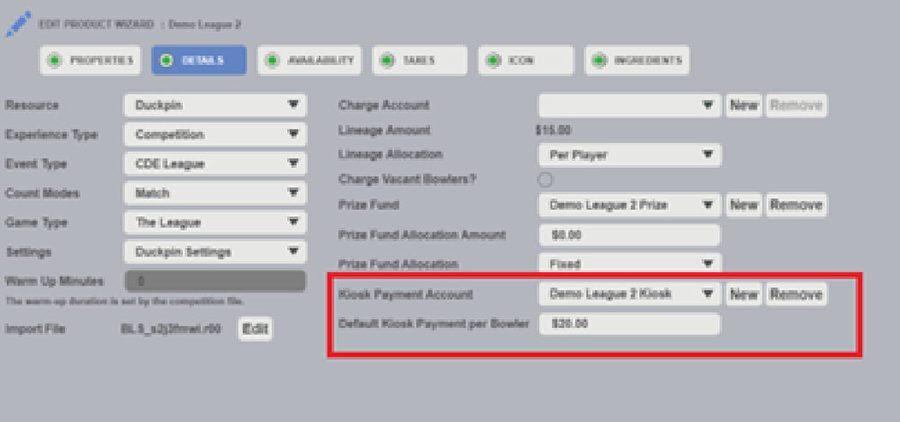
The individual league payment settings are determined inside of the league product itself. You can find these settings inside of SYNC Office by navigating to **Sales** \> **Products**. Once there, you can double click the name of the specific league product that you wish to edit and select the **Details** tab. From here, pictured below, you can designate the account in which league kiosk payments should be deposited and the default amount for a kiosk payment per bowler. \*Leagues must contain an R file to appear on your SSK League Payment Screen.
\*\*Kiosk Payment must be connected to a “Kiosk Payment” Account Category Type. When processing leagues, the kiosk payment will need to be pulled from the account to pay league fees or deposit into the league’s prize fund account.
#### Kiosk League Payment Settings
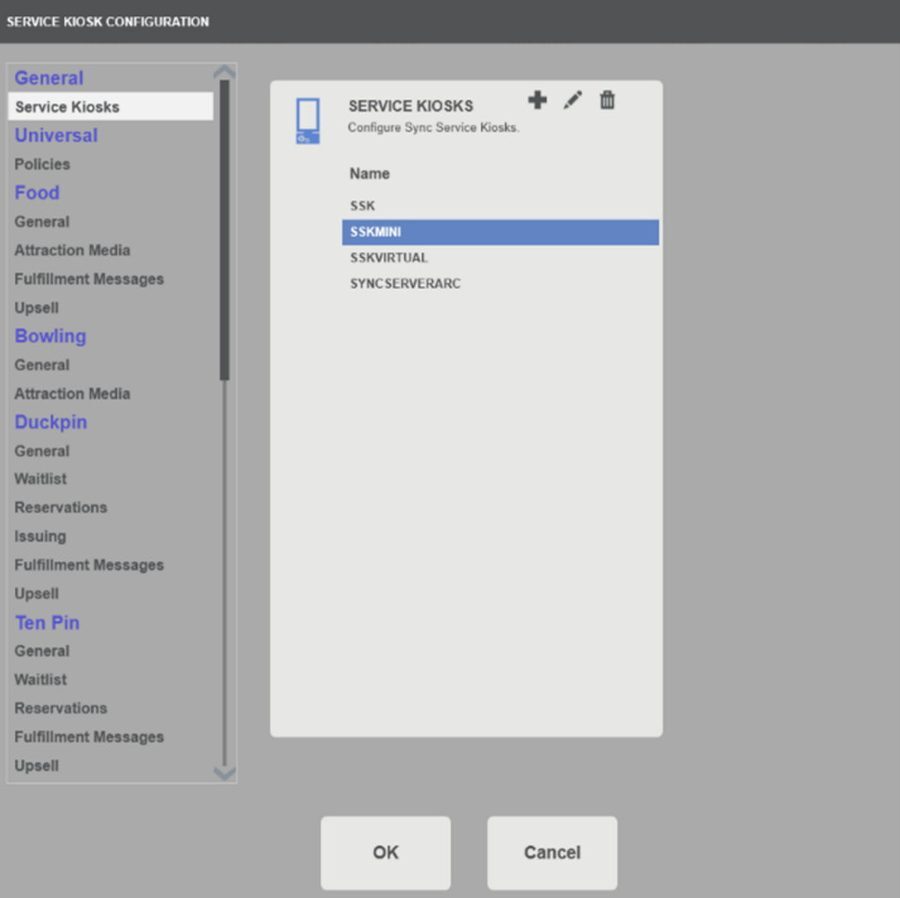
1. Enable your SSK to accept league payments by navigating to Admin \> Service Kiosks. Once here, pictured below, double click on the name of the kiosks that you would like to edit.
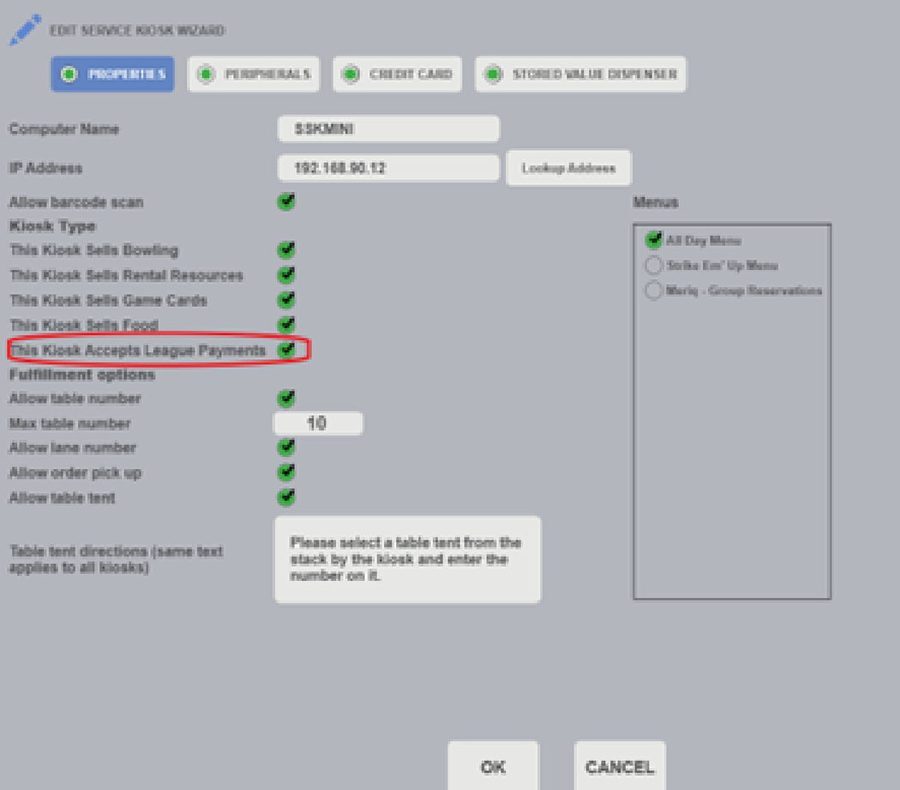
1. Check the bubble next to “This Kiosk Accepts League Payments”.
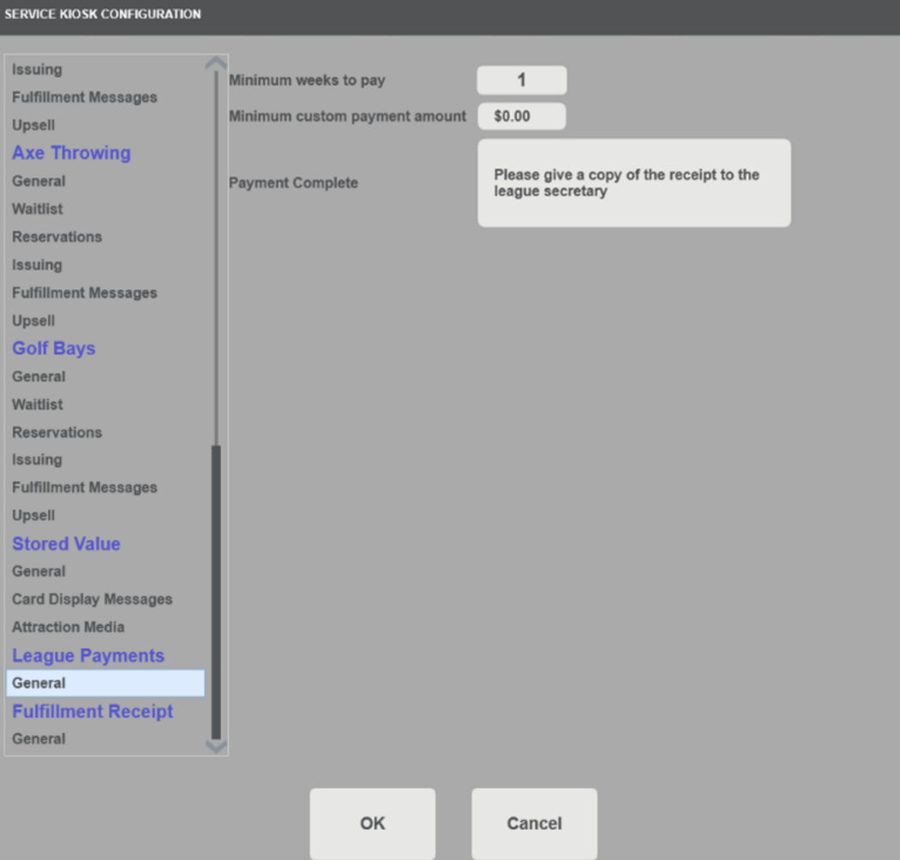
1. Use the scroll bar on the left-hand side of the Service Kiosk Configuration menu to locate the “League Payments” section and click General.
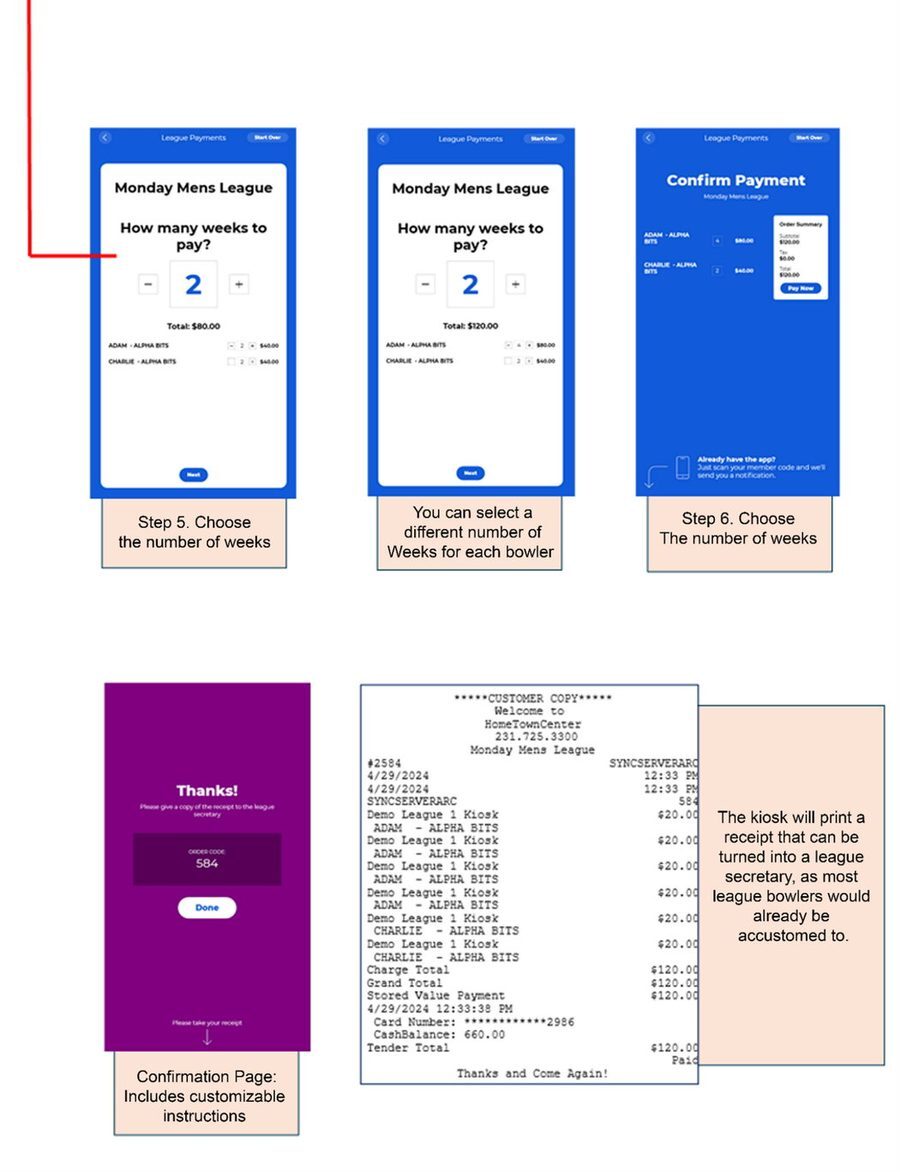
- From this page, you can determine the minimum number of weeks and a minimum payment amount that must be paid. You can also customise the payment confirmation message and include any instructions that your league bowlers need to be made aware of. For example, if the league secretary would like a copy of the receipt, that information can be entered here.
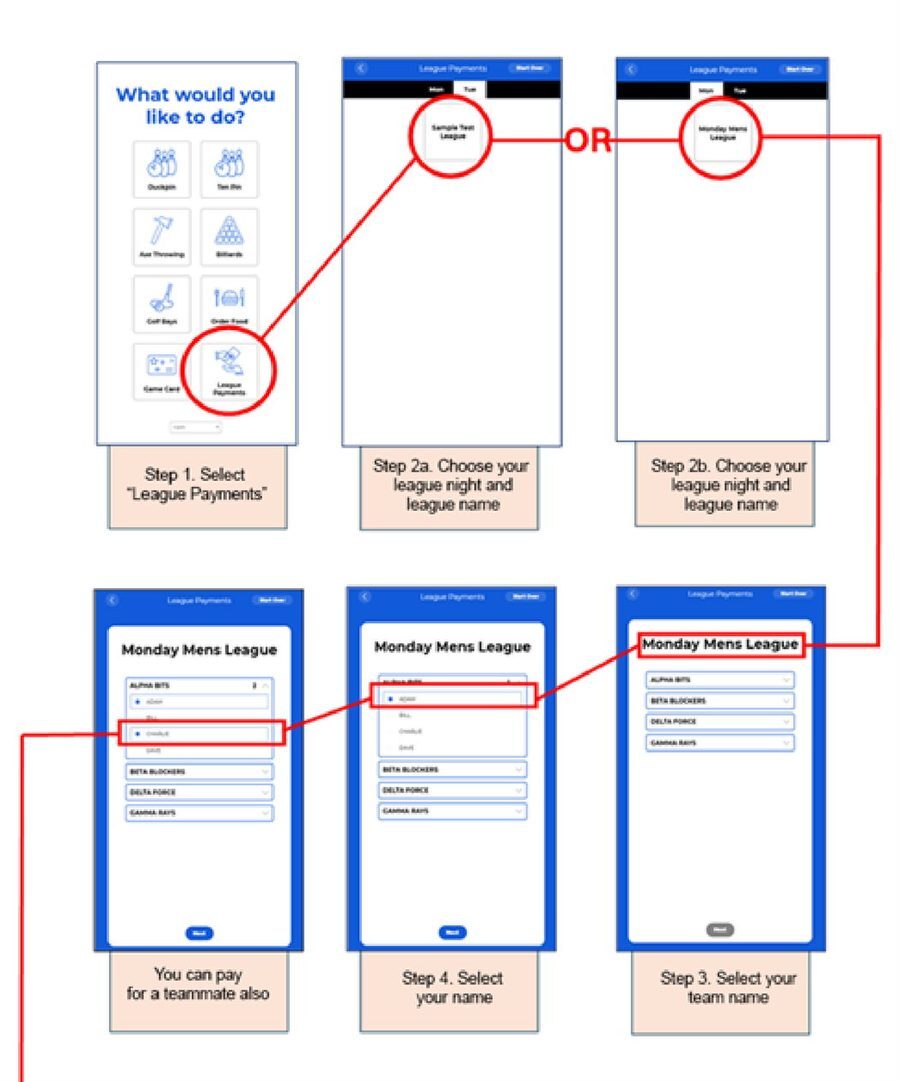
### League Bowler Flow
---
### Related articles
- [SYNC Self-Service Kiosk: Best Practices (overview)](https://info.southpacificbowling.com/help/sync-self-service-kiosk-best-practices?hsLang=en)
- [SYNC Self-Service Kiosk: Promoting Kiosk Use](https://info.southpacificbowling.com/help/sync-kiosk-promoting-kiosk-use?hsLang=en)
- [SYNC Self-Service Kiosk: Menu Building](https://info.southpacificbowling.com/help/sync-kiosk-menu-building?hsLang=en)
- [SYNC Self-Service Kiosk: Food Flow](https://info.southpacificbowling.com/help/sync-kiosk-food-flow?hsLang=en)
- [SYNC Self-Service Kiosk: Bowling Flow](https://info.southpacificbowling.com/help/sync-kiosk-bowling-flow?hsLang=en)
- [SYNC Self-Service Kiosk: Attraction Flow](https://info.southpacificbowling.com/help/sync-kiosk-attraction-flow?hsLang=en)
### Need a hand?
South Pacific Bowling supports Brunswick SYNC across Australia, New Zealand and the South Pacific. Talk to us about kiosk configuration, menu building, attractor artwork, staff training or additional hardware.
**1300 727 709** · support@southpacificbowling.com · southpacificbowling.com
- [Support](https://info.southpacificbowling.com/help/support?hsLang=en)
- [Leagues](https://info.southpacificbowling.com/help/leagues?hsLang=en#main-content)
- [BLS](https://info.southpacificbowling.com/help/leagues?hsLang=en#bls)
- [Sync](https://info.southpacificbowling.com/help/sync?hsLang=en#main-content)
- [Service Kiosks](https://info.southpacificbowling.com/help/sync?hsLang=en#service-kiosks)
- [Spark](https://info.southpacificbowling.com/help/spark?hsLang=en)
# South Pacific Bowling
[mailto:email@email.com](mailto:email@email.com)
Copyright © 2026, South Pacific Bowling